| Author |
Message |
Naja
Member
06-28-2003
| Tuesday, December 31, 2024 - 11:01 am 


I think I found the problem. I should have known to look there right away.
It was settings in System Mechanic. All the boxes were checked to remove during cleaning.
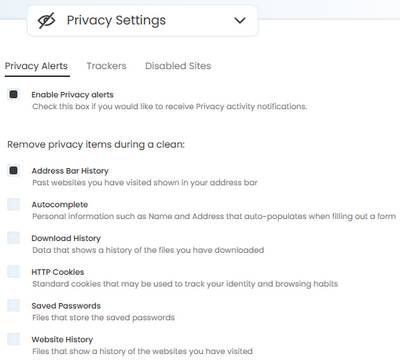
|
Karuuna
Board Administrator
08-30-2000
| Tuesday, December 31, 2024 - 11:06 am
Ah, Windows thing then?
|
Naja
Member
06-28-2003
| Tuesday, December 31, 2024 - 11:16 am
No, I have Iolo System Mechanic. I've had it over 20 years now. Actually, I have upgraded to the "ultimate Defense" version this past few years.
https://www.iolo.com/
|
Dipo
Member
04-22-2002
| Friday, May 23, 2025 - 11:51 am
NEW Q: We have a lot of people who don't hear well here and they complain that they can't hear at meetings. I was wondering if there is a way to use an IPAD to cast Closed Caption up on the TV in the activities area. We currently have Alexa announce Bingo numbers there so that people can hear and see it.
Is this something that would work? And if so, how would I do it? Thanks!!
|
Heckagirl631
Member
09-08-2010
| Tuesday, May 27, 2025 - 6:07 pm
No idea, Dipo. I wanted to post how we solved a problem with our printer. We recently upgraded to Google Fiber. So I thought everything was just not on the same network. But my son said that had nothing to do with a printer. So anyway, I looked where the networks were listed and found the printer listed also. So I clicked on it and tried to input a password, which had never been done before. They had never done that before. My son saw info where it said to put it the numbers--1 through 8. And that solved it. The printer printed what we needed. Yay!
|
Dipo
Member
04-22-2002
| Thursday, September 18, 2025 - 1:13 pm
So the weirdest thing happened this morning, I was dusting my file cabinet where I have stuck a couple of tablets that just wouldn't work anymore. As I moved them one of them just started up! It was so weird, I think the problem was that I couldn't get it to power. So now I have it hooked up to power to see if it will work again.
I was just going to get a small tablet down from the closet and charge it so I can put my Lazyfit app on it. The tablet that currently has the lazyfit app is giving me trouble charging very slowly, so I think it has a problem in the power port.
Anyway, I just thought it was odd that the older tablet decided to work.
|
Naja
Member
06-28-2003
| Tuesday, November 18, 2025 - 6:40 am
If anybody is having trouble accessing websites like I am while getting this message "Please unblock challenges.cloudflare.com to proceed.", don't go looking for solutions. It's because the protection service they use "cloudflare" is down globally right now.
Cloudflare status page
https://www.cloudflarestatus.com/
|
Mack
Member
07-22-2002
| Tuesday, November 18, 2025 - 7:23 am
Had the same issue but it seems to being fixed. Just got into a forum that was unavailable before.
|
Kookliebird
Member
08-04-2005
| Sunday, November 30, 2025 - 10:35 am
Well, I broke down and got a Windows 11 computer yesterday. Too many of the apps I use regularly are now Windows 11 based. Plus, my existing computer has issues at times that makes me want to throw it across the room sometimes. The final straw was my tax program that will not work in 2025 on Windows 10. I ordered the new one at Dell, to get exactly what I needed. It was delivered yesterday.
So far, so good with the new computer. I downloaded all my apps. Today, I’ll try to migrate the data from the old computer to the new one. I splurged and bought the extra migration tool for $40 to try to save some headaches. Mostly, I’m concerned about my photography catalog transfer. I’ve had troubles in the past which is why I put off a new computer for so long.
The cost was about half of what I paid 10 years ago. Crazy, cause you get so much more now.
|
Jimmer
Board Administrator
08-29-2000
| Sunday, November 30, 2025 - 2:52 pm
Always nice to get a new computer. Amazing how the technology improves over the years.
|
Juju2bigdog
Member
10-26-2000
| Sunday, November 30, 2025 - 8:43 pm
I am seriously thinking about doing that too, Kooklie, although I do have a couple of used Dell laptops with Windows 11 on them, likely with early phase release versions on them.
What are people doing these days for Office software? I am still making do with pretty old versions of Office that came already installed on refurbished laptops I bought from refurbishers on eBay.
|
Jimmer
Board Administrator
08-29-2000
| Sunday, November 30, 2025 - 8:49 pm
Unless you’re using office for some sort of very complicated task, the old versions work perfectly fine. If you have them, I don’t see any compelling reason to invest in paying annually for a new version whose features you may not need.
|
Kookliebird
Member
08-04-2005
| Sunday, November 30, 2025 - 10:17 pm
I use the old versions of Office, as well. Mostly, I use Excel, but will use Word once in awhile. Used it more when I was on the recycling committee at my condo building. I liked making signs and pamphlets.
|
Jimmer
Board Administrator
08-29-2000
| Monday, December 01, 2025 - 11:37 am
In some respects, I actually prefer the older versions. The newer versions are very top-heavy and clunky. In an effort to make things easy, sometimes Microsoft makes things harder. However, if you share documents with other people, one possible downside to using an older version is that the older versions may not be able to read the latest Word or Excel files as Microsoft has changed their format and added features over the years.
|
Naja
Member
06-28-2003
| Monday, December 01, 2025 - 12:09 pm
I'm so excited for you Kookliebird! For me, getting a new computer is one of the most fun things ever 
I mostly use my desktop, but I do have to replace my laptop soon. It's also a Dell but it's old. I'm going to wait until I'm settled in after I move at the end of the month.
|
Juju2bigdog
Member
10-26-2000
| Monday, December 01, 2025 - 9:08 pm
Okay, thanks, kids. The older versions of Office that I have are working fine, just didn't want to get left behind if everybody else has already left me in the dust. This old age thing goes so fast it is almost astonishing.
|
Kookliebird
Member
08-04-2005
| Tuesday, December 02, 2025 - 7:46 am
Everything transferred fine from my old computer, except some of my photo links in my photoshop elements from an external hard drive. One drive worked fine, the other did not. But, the fix, while tedious and will take some time, is easy. Overall, I have to say that the transition tool that I purchased extra was a godsend, compared to prior transitions that I remember. Once got all my settings over to the new computer, it looked just like my old one… albeit much faster.
|
Jimmer
Board Administrator
08-29-2000
| Tuesday, December 02, 2025 - 10:52 am
Great it’s working so well. I’m sure it’s much faster!
|
Grooch
Member
06-16-2006
| Wednesday, March 11, 2026 - 12:54 pm
When I download a picture from the internet, my tablet saves it as a web.(something). It used to save it as a jpg. So, I can't resize it to post it.
How do I save it as a jpg? I have a Samsung tablet.
|
Naja
Member
06-28-2003
| Wednesday, March 11, 2026 - 1:15 pm
There 2 ways I can think of. Make it full screen and take a screen shot. Or save the whole page as "Html and images" and the photo will be downloaded into a folder with all the other images from the page with it.
|
Jimmer
Board Administrator
08-29-2000
| Wednesday, March 11, 2026 - 2:23 pm
It’s a new image format or file type that’s being used more and more because it is more efficient than JPEG
As Naja suggested, taking a screenshot is probably the simplest approach and then resizing from there. There are programs that will read those files and resize them and convert them to JPEG but that’s getting a little more complex.
|
Grooch
Member
06-16-2006
| Wednesday, March 11, 2026 - 2:35 pm
OK, next question.
How do I take a screenshot?
|
Jimmer
Board Administrator
08-29-2000
| Wednesday, March 11, 2026 - 4:41 pm
I’m not sure how you do it on a Samsung tablet. On an iPhone, you do it by simultaneously pressing the volume up and power buttons.
|
Mameblanche
Member
08-24-2002
| Wednesday, March 11, 2026 - 9:52 pm
On my Samsung phone I just slide the edge of my hand over the page for screenshots.
|
Karuuna
Board Administrator
08-30-2000
| Thursday, March 12, 2026 - 8:12 am
both methods for doing a screenshot should work. Whenyou do a screenshot however, you get the full screen, not just the image, so you will have to crop:
"To take a screenshot on a Samsung tablet,
simultaneously press the Power (Side) and Volume Down buttons. The screen will flash, and you can immediately edit or share via the toolbar. Alternatively, use a palm swipe (swipe edge of hand across screen) or ask Bixby/Google Assistant."
Lots of videos on how to do this on Youtube. It's a popular question!
|
Kookliebird
Member
08-04-2005
| Thursday, March 12, 2026 - 9:58 am
I just say, “ Hey Siri.. Screenshot”
Does Samsung have something similar to Siri?
|
Grooch
Member
06-16-2006
| Thursday, March 12, 2026 - 10:44 am
I don't use my voice for anything electronic. I'm leery of it.
I can't get the palm swipe to work, but I can do the power off/volume thing. But like Kar says, it includes a lot more that I would have to edit out.
Not worth the trouble. I guess no more pictures for me. Oh, well.
|
Karuuna
Board Administrator
08-30-2000
| Thursday, March 12, 2026 - 10:59 am
Grooch, there are programs that will convert those images for you, back to jpg.
Also this,
"On Samsung Galaxy tablets, you can use the Smart Select (or AI Select) tool via the Edge panel or S Pen to draw a shape around the specific area you wish to capture. "
|
Dipo
Member
04-22-2002
| Tuesday, March 31, 2026 - 2:53 pm
Has anyone had this happen, I went to play WordGuru and it says it has to make sure I am a human. So Cloudflare Id comes up and says I have to do these 4 steps to prove I am human. First is to "Open power shelf as admin".
Then there are 3 more steps. All I can imagine is it is installing some sort of virus on my computer so I just close it down and don't play the game.
Anyone know what it is"?
|
Grooch
Member
06-16-2006
| Tuesday, March 31, 2026 - 3:32 pm
It sounds like Cloudfare has virus to me. Glad you shut it down.
|
Grooch
Member
06-16-2006
| Sunday, June 21, 2026 - 2:30 am
Windows Alert!
WIRED
@wired.com
The cryptographic keys that secure your computer's boot sequence will start to expire on June 24. Here's what that means for you.
A Critical Deadline Is Approaching for Windows and Linux Security
quote:Machines that fail to update the Secure Boot-related keys will continue to function, but they will no longer be protected against new UEFI threats. To be clear, they were already vulnerable to new UEFI threats that exploited the industry-wide LogoFail vulnerability. The key refresh is designed to mitigate that risk and prevent unrelated UEFI attacks that may arise in the future.
To check the status of the keys on Windows machines, users can open Windows Security settings > Device Security > Secure Boot. A green checkmark means the update has been completed. Most Windows machines automatically update the keys during regular monthly patch distributions, but older machines may require manual attention. Linux users should watch for the release of new shims.
Microsoft recommends people stay current with all firmware updates, because they’re sometimes needed for Secure Boot certificates to update smoothly. The company has more information on applying firmware updates here
|


 Closed: New threads not accepted on this page